
Plane Finder AR11.2.0 - App Store
You'll be able to see results in few seconds.
Publisher Description
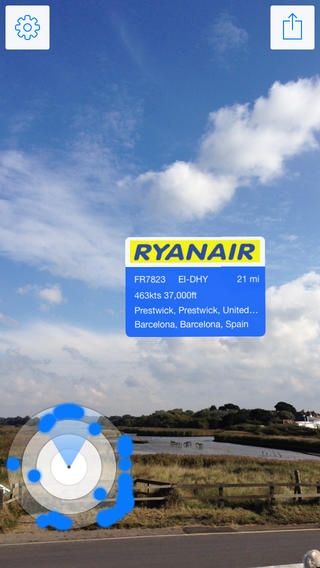

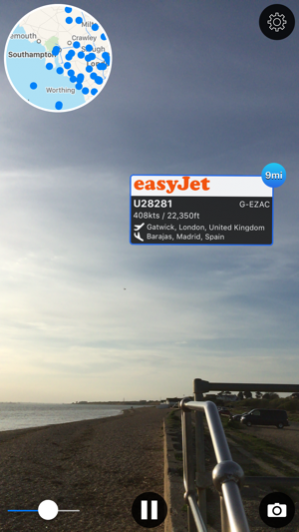

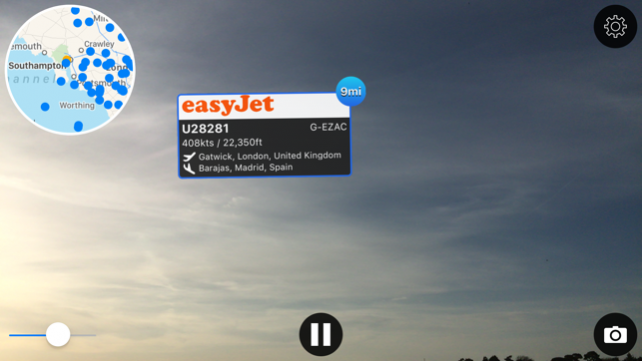
Wondered where that plane up above is going - Wonder no more!
Plane Finder AR - Point the camera at a plane and you'll see the airline, flight number, route, aircraft registration, speed, altitude and even how far away it is!
Amaze your friends with your newfound knowledge!
Those trails across the sky will no longer be a mystery!
Plane Finder AR is the original and best Augmented Reality plane tracking app. We are proud to have been featured by CNN, GMA, UK Sunday Times and many others.
Don't take our word for it either - check out our AppStore ratings and the wide range of positive press we've had across the world.
Plane Finder AR blends the data from our Plane Finder virtual radar apps with the Augmented Reality capabilities of your iPhone or iPad to show you what is flying overhead.
The app is fun to use and is very dynamic. It will work in all areas for which we have coverage.
Please check our web map at http://www.planefinder.net or ask a question via support@planefinder.net to make sure we cover your area.
Our global coverage is impressive and growing all of the time too!
Why not also check out our Plane Finder and Plane Finder 3D apps for an amazing radar like view of the air traffic across the world.
Frequently Asked Questions
What is the difference between Plane Finder AR and Plane Finder?
Plane Finder AR is our augmented reality app that shares the data available in Plane Finder- our original iPhone App. Plane Finder provides a near real time virtual radar view of flight from across the world and include a great deal more detail that Plane Finder AR. All Plane Finder apps share common ADS-B data.
Why can't I see all planes?
Aircraft must be carrying ADS-B equipment and we must have a feed in the area. (In the US airlines have been slow to adopt the technology but usage is continuing to rise).
What if my area isn’t covered?
We are always on the lookout for more data feeds. Check back regularly to see if we have added your area. You could even help us by running a free receiver!
If I have an ADS-B receiver can I share my data for use with Plane Finder AR?
Yes. Please contact support@pinkfroot.com and we will assist.
Can I use Plane Finder AR for navigational purposes?
Definitely not. Plane Finder must not be used for navigational purposes under any circumstances
**Whilst we do have the best network please double check coverage using our free app Plane Finder Lite to make sure that we have coverage for your area**
Disclaimer: The use of the information presented using Plane Finder is strictly limited to your pursuing enthusiast activities (i.e. for entertainment purposes), which specifically exclude any activities that might endanger yourself or the lives of others. Under no circumstances will the developer of this application be held responsible for incidents resulting from the use of the data or its interpretation or its use contrary to this agreement.
Nov 8, 2018 Version 11.2.0
Support for new iPad Pro devices
About Plane Finder AR
The company that develops Plane Finder AR is pinkfroot limited. The latest version released by its developer is 11.2.0.
To install Plane Finder AR on your iOS device, just click the green Continue To App button above to start the installation process. The app is listed on our website since 2018-11-08 and was downloaded 0 times. We have already checked if the download link is safe, however for your own protection we recommend that you scan the downloaded app with your antivirus. Your antivirus may detect the Plane Finder AR as malware if the download link is broken.
How to install Plane Finder AR on your iOS device:
- Click on the Continue To App button on our website. This will redirect you to the App Store.
- Once the Plane Finder AR is shown in the iTunes listing of your iOS device, you can start its download and installation. Tap on the GET button to the right of the app to start downloading it.
- If you are not logged-in the iOS appstore app, you'll be prompted for your your Apple ID and/or password.
- After Plane Finder AR is downloaded, you'll see an INSTALL button to the right. Tap on it to start the actual installation of the iOS app.
- Once installation is finished you can tap on the OPEN button to start it. Its icon will also be added to your device home screen.
Program Details
System requirements
Download information
Pricing
Version History
version 11.2.0
posted on 2018-11-08
Nov 8, 2018 Version 11.2.0
Support for new iPad Pro devices
version 7.1.1
posted on 2010-09-17
version 11.2.0
posted on 1970-01-01
2018年11月8日 Version 11.2.0
Support for new iPad Pro devices
Disclaimer
Official App Store Link
We do not host Plane Finder AR on our servers. We did not scan it for viruses, adware, spyware or other type of malware. This app is hosted by Apple and passed their terms and conditions to be listed there. We recommend caution when installing it.
The App Store link for Plane Finder AR is provided to you by apps112.com without any warranties, representations or guarantees of any kind, so access it at your own risk.
If you have questions regarding this particular app contact the publisher directly. For questions about the functionalities of apps112.com contact us.
